Kostenberechnung auf Excel-Basis
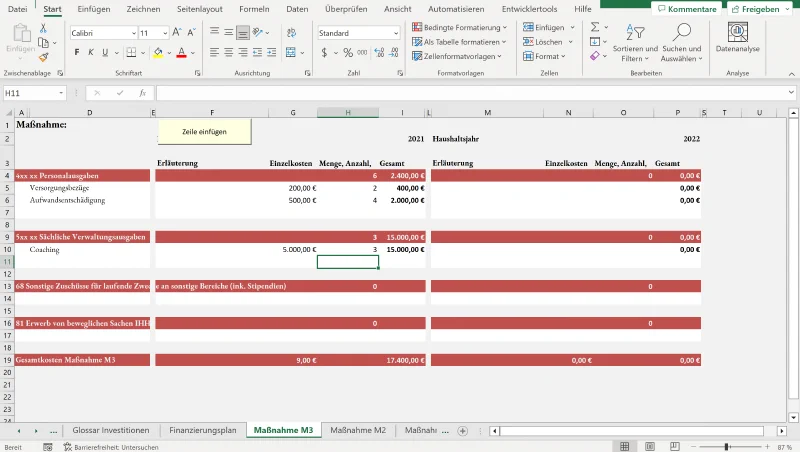
For the Institut für Auslandsbeziehungen e.V. (IFA), BusinessCode developed a solution based on Excel. “BusinessCode is the right partner for such projects—we take our customers’ existing processes into account, if that’s what they want,” explains CEO Martin Schulze. Other clients of the Bonn-based IT company have already recognized this added value. But what exactly is the project for IFA about?
The Institut für Auslandsbeziehungen e.V. (IFA), as an intermediary organization for foreign cultural policy, promotes international art and cultural exchange. For years, cost calculations were entered and processed manually in Excel spreadsheets. In 2021, IFA approached the Bonn-based digitalization expert BusinessCode and commissioned an Excel tool to simplify calculations and processes. For this, IFA also submitted a design proposal for the tool.
The Excel Foundation Remains, Cost Calculation Simplified
BusinessCode developed the tool on an Excel basis, enhanced with functions tailored specifically for IFA. This includes the creation of glossaries with translations within the tool. In concrete terms, this means that if a project or a specific measure is internally referred to as “A” but externally as “B,” this translation from A to B happens automatically in the tool.
The tool works using VBA macros. In software development, a macro is a summarized sequence of instructions or declarations under a specific name. This means they can be executed with just a simple call. For the tool, this means: certain rules and conditions are stored in the background. For example, if something is entered in field A, it is automatically added to field B accordingly.
The projects for which costs are to be calculated can be created in a master table. For this, the user enters the number of actions, the so-called measures (several subcategories of funding, such as personnel costs), the start and end of the project, and the file name.
Listing All Items of a Project
With this information, the funding plan for the project application is created. All measures (the number of actions from the previous step) are clearly presented, divided into fiscal years—the period during which the project runs. The user can insert and name new rows (e.g., “casual staff”), specify the costs, and everything is summed up in the main sheet. The table can then be exported as a PDF, and the completed funding plan can be issued and published.