BusinessCode Transforms Excel into a Custom Solution
Excel is indispensable on the desktops of medium-sized businesses. When it comes to planning and calculations, Excel remains the number one tool, and the software experts from Bonn don’t want to change that. However, Excel isn’t always sufficient for quickly obtaining reliable results, as was the case here.
Better Without Manual Intervention
A calculation is only as good as the data Excel has access to. The biggest source of errors is the human factor - people manually entering numbers into spreadsheets. To eliminate this very source of errors, the ifa (Institute for International Cultural Relations) commissioned BusinessCode to develop an Excel-based solution without changing existing processes. This was an important requirement for the client.
The tool primarily serves to automate the standardization of financial plans within the context of funding applications, including their automatic adaptation to a predefined special chart of accounts (grouping plan of the federal government).
The Excel Basis Remains, Cost Calculation Simplified
BusinessCode expanded the Excel-based tool with customized functions for the ifa (Institute for International Cultural Relations). This included creating glossaries with translations within the tool. Specifically, if a project or measure is internally referred to as “A” but externally as “B”, the tool automatically translates A to B. This is a significant relief, according to those involved.
The tool itself contains specific rules and conditions. For example, if something is entered in field A, it is automatically completed in field B. Projects for which costs are to be calculated can be created in a master table. To do this, the user only needs to enter the number of actions, the start and end of the project, and the file name.
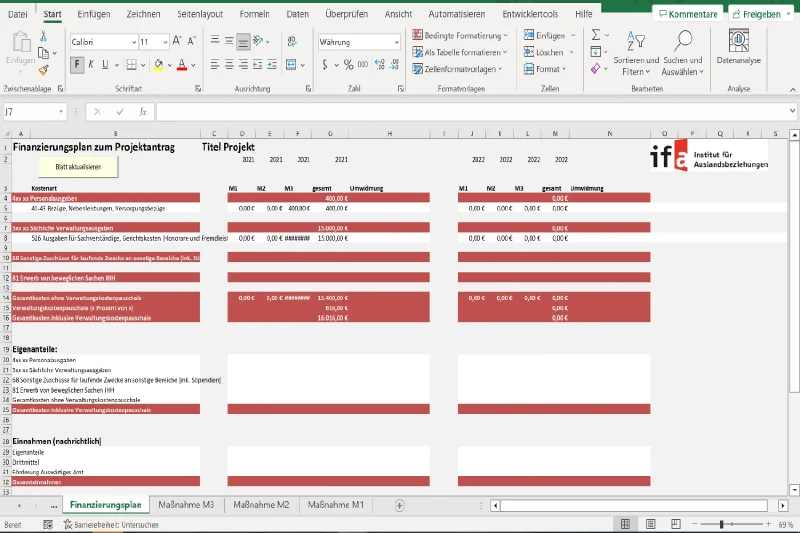
With this information, the financial plan for the project application is created. All measures are clearly presented, broken down by budget year and the period during which the project runs. The user can insert new lines and name them (e.g., “Temporary Help”) and specify the costs. In the main sheet, everything is summed up. The table can then be exported as a PDF, and the created financial plan can be published.
Clear and Fast – The Goal Was Achieved
“In a project like this, we can show how standard tools can be significantly improved with individual enhancements. The result is a tailor-made solution that digitally streamlines processes throughout,” concludes Martin Schulze.
Image caption: Screen of the solution
BusinessCode erweiterte das Tool auf Excel-Basis um für das ifa (Institut für Auslandsbeziehungen) maßgeschneiderte Funktionen. Dazu gehörte auch, dass das Digitalisierungsteam im Tool Glossare mit Übersetzungen anlegte. Konkret bedeutet dies, wenn ein Projekt oder eine bestimmte Maßnahme intern unter dem Begriff „A“ läuft, extern aber „B“ heißt, findet diese Übersetzung von A nach B automatisch im Tool statt. Eine spürbare Erleichterung, sind sich die Beteiligten sicher.
Im Tool selbst sind bestimmte Regeln und Bedingungen hinterlegt. Wenn bspw. etwas in Feld A steht, wird es in Feld B entsprechend ergänzt. Die Projekte, deren Kosten berechnet werden sollen, lassen sich in einer Mastertabelle anlegen. Dafür reicht es, wenn der User die Anzahl der Aktionen, den Beginn, das Ende des Projektes und den Dateinamen dort einträgt.
Mit diesen Angaben wird der Finanzierungsplan zum Projektantrag erstellt. Darin werden alle Maßnahmen übersichtlich dargestellt, aufgeteilt in Haushaltsjahre, den Zeitraum, in denen das Projekt läuft. Der User kann neue Zeilen einfügen und benennen (bspw. „Aushilfen“) und die Kosten dafür angeben. Im Mainsheet wird dann alles summiert. Im Anschluss kann die Tabelle als PDF exportiert, der erstellte Finanzierungsplan herausgegeben und veröffentlicht werden.
Übersichtlich und schnell – das Ziel wurde erreicht
„In einem solchen Projekt können wir zeigen, wie sich Standardtools durch individuelle Ergänzungen deutlich verbessern lassen. Das Ergebnis ist eine maßgeschneiderte Lösung, die die Prozesse durchgehend digitalisiert“, schließt Martin Schulze.
Bildunterschrift: Screen der Lösung